Moto Book 60 Review: India's Most Affordable OLED Laptop Is Brilliant — And Comes With a Serious Warning.
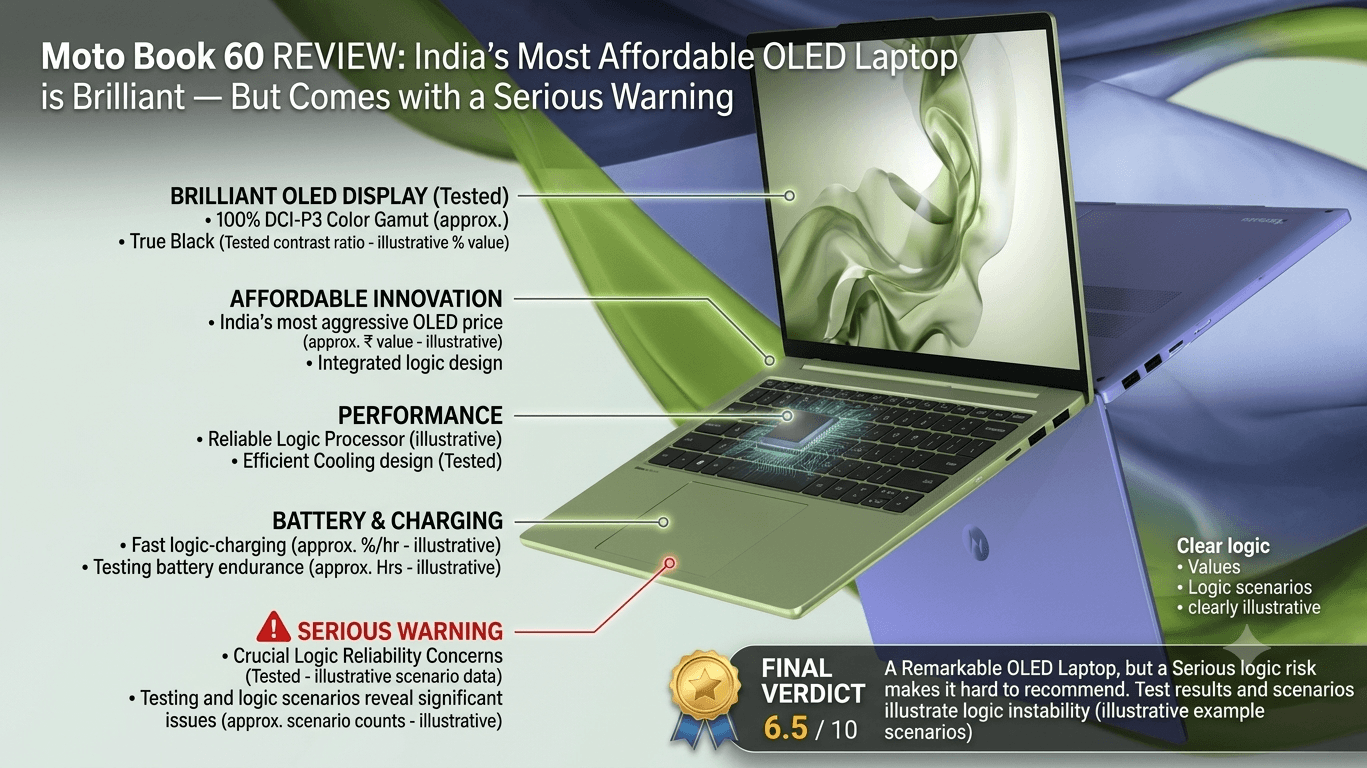
The Moto Book 60 delivers a 14-inch 2.8K OLED 120Hz display with 100% DCI-P3, an Intel Core 5 210H processor, 16GB DDR5 RAM, a full aluminium body, and 1.4kg portability at approximately ₹50,000 to ₹56,000 in India. It is the most visually impressive laptop available at its price in India — and also the one with the most concerning after-sales service reality. This is the review that tells you everything before you buy.
Moto Book 60 — At a Glance
Price: ₹54,999 (MRP) | From ₹45,000–₹50,000 during sales on Flipkart | Display: 14" 2.8K OLED 120Hz, 100% DCI-P3 | Chip: Intel Core 5 210H | RAM: 16GB DDR5 | Weight: 1.4kg | Battery: 60Wh
The Moto Book 60's OLED display is the single best screen available on any laptop under ₹60,000 in India. The aluminium build, the 1.4kg weight, and the 16GB DDR5 RAM round out a package that looks and feels far more premium than the price suggests. The battery life, the trackpad reliability issues, and the near-absent Motorola service network are the reasons this laptop comes with a serious caveat every Indian buyer must hear before purchasing.
Introduction
Motorola's re-entry into the Indian laptop market with the Moto Book series was not loudly announced — but the Moto Book 60 has quietly attracted considerable attention from students, young professionals, and budget-conscious creatives who want an OLED display without paying ₹80,000 or more for a MacBook or a premium Windows ultrabook. The Moto Book 60, powered by Intel Core 5 210H, 16GB DDR5 RAM, a 512GB SSD, and most prominently a 14-inch 2.8K OLED panel with a 120Hz refresh rate and 100% DCI-P3 colour coverage, makes a specification case that is genuinely difficult to argue with at approximately ₹50,000 during sale pricing. Independent reviewers and buyers who purchased the laptop during sale events have consistently described the display as the highlight that changes the entire experience of owning a budget laptop. What no marketing material prominently discloses — and what this review addresses honestly — is that the Moto Book 60 comes with real-world limitations in battery life, trackpad reliability, and most critically, an after-sales service network so thin and undertrained that multiple independent reviewers and buyer communities have flagged it as a serious risk for a device that must last three to five years of daily use in India. This review covers both sides of the Moto Book 60 story completely — because an informed purchase is the only good purchase.
Design & Build Quality
The Moto Book 60's physical presentation is the first and most immediate surprise for Indian buyers accustomed to the plastic chassis that dominate the sub-₹55,000 laptop segment. The full aluminium unibody construction — top lid, keyboard deck, and base — gives the laptop a density and rigidity that genuinely makes it feel like a product that costs ₹80,000 or more. Reviewers at vsctimes.com were direct: if you hand this laptop to someone without telling them the price, most people will not guess it is a ₹45,000 to ₹55,000 machine. The finish is clean, the edges are bevelled, and the surface resists fingerprints and smudging better than most aluminium laptop bodies in the Indian market. The hinge mechanism deserves specific mention: it is calibrated precisely enough to lift the lid with a single finger, and it does not wobble or oscillate during typing — a detail that many budget laptops at this price fail on and that you interact with every single day. At 1.4 kilograms, the Moto Book 60 is genuinely portable for its 14-inch class — lighter than the ASUS Vivobook 16 and the Lenovo IdeaPad Slim 3 at comparable configurations. For Indian college students carrying a laptop between classes and hostels, or professionals commuting to Bengaluru or Mumbai office spaces, the weight differential is perceptible and meaningful. The backlit keyboard provides comfortable key travel and adequate spacing for extended typing sessions. The 720p webcam handles video calls for Zoom, Google Meet, and Teams at acceptable quality for professional use in reasonable lighting. Face recognition via Windows Hello is supported and works reliably. One honest build criticism: the ventilation design means the fan is audible under sustained loads — not aggressively loud, but present enough to notice in quiet environments like libraries or early-morning home study sessions.
The OLED Display — Where the Moto Book 60 Earns Its Reputation
The 14-inch 2.8K OLED display with a 120Hz refresh rate, 500 nits peak brightness, and 100% DCI-P3 colour gamut coverage is the Moto Book 60's defining feature — and the primary reason it continues to appear on best-laptop-under-₹50,000 lists months after launch. In the Indian laptop market in 2026, OLED displays remain unusual at prices below ₹60,000. IPS LCD panels dominate the budget segment, and while the best of them are serviceable, none deliver the infinite contrast ratios, the pixel-perfect black levels, or the colour vibrancy that OLED technology provides. The Moto Book 60's panel changes the character of everything displayed on it: YouTube videos and Netflix streaming content at 2.8K resolution have a depth and richness that transforms budget-laptop media consumption into something that would not be out of place on a ₹90,000 premium ultrabook. For Indian users who consume significant OTT content — JioCinema, Netflix, YouTube, Hotstar — the display difference is viscerally apparent and immediately justifying. For design and photo editing work — Photoshop basics, Canva, Lightroom at an introductory level — the 100% DCI-P3 coverage means colours on screen correspond closely to how images will appear on calibrated displays and when printed. This is a meaningful advantage for photography students, graphic design learners, and social media content creators who need colour accuracy without a professional colour-graded monitor. The 120Hz refresh rate makes everyday Windows navigation — scrolling, cursor movement, animation — noticeably smoother than the 60Hz displays on competing budget laptops, and contributes to a perception of system responsiveness that goes beyond what processor benchmarks alone convey. The display's one limitation is outdoor visibility: OLED panels are inherently glossy, and in bright outdoor environments — working on a balcony, studying in a sunlit café, or commuting with the laptop open — reflections are more pronounced than on the matte anti-glare IPS panels of competing budget laptops. Keeping a charger nearby and reducing brightness in indoor use helps manage the battery drain that the OLED panel's default high brightness setting can cause.
Performance
The Intel Core 5 Series 2 210H processor paired with 16GB DDR5 dual-channel RAM delivers a computing experience that is meaningfully above the AMD Ryzen 5 7520U and Intel Core i5-1335U alternatives available in competing laptops at similar price points. Geekbench 6 results measured by vsctimes.com produced approximately 2,400 in single-core and 9,600 in multi-core testing — figures that comfortably handle the workloads that students and office professionals in India encounter daily: VS Code with multiple extensions, Chrome with 20 or more tabs, Microsoft Office 365, Google Workspace, Zoom meetings, PDF annotation, and Python or Java development for computer science students. The 512GB NVMe SSD boots Windows 11 in under 15 seconds from cold start and launches applications with the immediacy that SSD storage provides — a qualitative difference from the older HDDs that still appear in some budget laptop configurations. For students doing Android development in Android Studio, the 16GB DDR5 RAM is the configuration that makes medium-complexity projects buildable without constant memory swapping to storage. The Intel Arc integrated graphics handles the laptop's display output and provides enough GPU capability for light creative work — Photoshop at introductory levels, basic video editing in CapCut or DaVinci Resolve at 1080p, and 2D design work in Illustrator or Canva. It is not a gaming GPU: GTA V runs at low settings, and competitive AAA titles will require frame rate and resolution compromises that make the Moto Book 60 an impractical choice for buyers whose primary use is gaming. Sustained heavy loads — prolonged video export, extended gaming sessions — do push the thermal system to its limits, with fan noise and surface warmth that are expected for a thin 14-inch aluminium chassis but worth noting for buyers who assumed the premium build equated to silent operation under pressure.
The Moto Book 60's OLED display at ₹50,000 is genuinely remarkable — the kind of feature that changes the reference point for what a budget laptop is supposed to look like. The service network problem is equally genuine. Both facts are true simultaneously, and both belong in any honest review written for Indian buyers.
Battery Life — The Honest Reality
Battery life is the Moto Book 60's most consistent limitation, and no honest review should minimise it. The 60Wh battery is rated for up to 6 hours — but Motorola's own rating and real-world reviewer results diverge significantly when the OLED display is used at comfortable brightness levels. MyPitShop's review was direct: at full brightness optimising the OLED panel's visual potential, real-world battery life for web browsing and document writing is approximately 4 to 5 hours maximum. vsctimes.com's daily use testing confirmed that keeping brightness at 50% or below extends usable battery toward 5 to 6 hours — functional for a college lecture or a half-day of office work, but insufficient for a full workday without a charger nearby. The primary reason for this limitation is physics: OLED panels draw more power at high brightness levels than equivalent IPS LCD panels, and the Intel Core 5 210H's performance configuration prioritises processing headroom over maximum efficiency. This is a deliberate trade-off that delivers a better display and faster processor at the cost of battery endurance — and it is one that Indian buyers need to make with clear awareness. Buyers who work in offices with desk charging access, students who carry a charger in their college bag, and users whose daily sessions are 4 to 5 hours rather than 8 to 9 hours will find the battery acceptable. Buyers who need genuine all-day untethered performance — field workers, students in campuses without consistent power access, or professionals who move between locations throughout the day — will find the battery genuinely limiting and should consider the ASUS Vivobook 15 or Lenovo IdeaPad Slim 3, which offer 7 to 9 hours of real-world battery life with their IPS displays at a cost in display quality.
The Trackpad Issue — A Known Problem
The Moto Book 60's trackpad is the subject of a specific and well-documented real-world complaint that multiple independent reviewers and buyer communities have reported — and it warrants its own section in any responsible review. MyPitShop's review described recurring instances of the trackpad becoming unresponsive during use, requiring a workaround of navigating to Device Manager, uninstalling human interface drivers, and refreshing them to restore function — a process that resolves the issue for approximately one week before it recurs. Reddit communities of Moto Book 60 owners have reported similar experiences with the same trackpad intermittency. A software driver-level issue of this consistency, requiring recurring manual intervention on a laptop that costs ₹50,000 and is intended for daily professional and academic use, is a significant quality control concern. It does not affect every unit — many buyers report no trackpad issues — but its frequency in the owner community is too significant to dismiss or minimise. Before purchasing, Indian buyers should be aware of this issue, keep a micro-USB or Bluetooth mouse as a backup, and ensure their retailer's return policy covers this type of software-driven hardware intermittency within the warranty period.
The Service Network Problem — The Most Critical Caveat
The Moto Book 60's most serious limitation for Indian buyers is not a hardware specification — it is an infrastructure problem that affects every owner who needs repair or support during their laptop's lifespan. MyPitShop's review team contacted multiple Motorola authorised service centres across India to assess repair support for the Moto Book 60 and found that most service centres had no familiarity with the product, some confused it with a Motorola phone, and Motorola's customer care line went unanswered across multiple contact attempts. Community feedback on the review's social media posts confirmed this was not an isolated experience — multiple Moto Book 60 owners across India reported identical difficulties accessing competent service support. For context: HP, Lenovo, ASUS, Dell, and Acer all operate established, professionally staffed laptop service networks across tier 1 and tier 2 Indian cities with trained technicians, available spare parts, and predictable turnaround times. Motorola, as a relatively recent entrant to the Indian laptop market with a product that is manufactured and positioned primarily around display novelty, has not yet built the equivalent service infrastructure. This matters profoundly for a laptop purchase because a ₹50,000 laptop is intended to serve its owner for three to five years. In that time, batteries degrade and require replacement, screens can crack from drops, charging ports can wear, and motherboard-level issues can arise. A service network that cannot confidently support the product means that any significant hardware failure during the warranty period — or more critically, after it — may result in a non-functional laptop with no accessible repair path. MyPitShop's conclusion was stark: until Motorola fixes its service network in India, they cannot recommend the Moto Book 60 to most buyers. This review agrees with that assessment as a material risk factor — and every Indian buyer must weigh it against the display's genuine excellence.
Competition in India
The Moto Book 60's competitive set in India's sub-₹55,000 segment is well-defined. The Lenovo IdeaPad Slim 3 (Ryzen 5 7520U, 16GB DDR5) at approximately ₹37,999 is the safest overall recommendation for most Indian buyers — proven performance, reliable Lenovo service network across India, 16GB DDR5 RAM, and IPS Full HD display at a price ₹12,000 to ₹17,000 lower than the Moto Book 60. It loses on display quality but wins on reliability, battery life, and after-sales confidence. The ASUS Vivobook 15 at ₹42,000 to ₹48,000 delivers ASUS's trusted service network, lightweight form factor around 1.7kg, 7 to 9 hours of real battery life, and ASUS India's established repair ecosystem — the right choice for students who carry their laptop all day and need all-day endurance. The ASUS Vivobook Go 15 OLED at approximately ₹39,900 is the most direct OLED alternative to the Moto Book 60, offering an OLED display at a lower price — but with a Ryzen 5 7520U processor and less impressive 15.6-inch panel resolution compared to the Moto Book 60's 2.8K 14-inch OLED. The Acer Aspire 7 at ₹45,000 to ₹49,990 adds a dedicated RTX 2050 GPU for light gaming capabilities that no integrated-graphics competitor at this price can match, at the cost of heavier weight and 4 to 5 hours of battery life. The Dell Vostro 15 3530 at approximately ₹45,000 offers Dell's excellent India service network and build quality for professionals who need long-term corporate repair support. Against all of these, the Moto Book 60 wins exclusively on display quality and aluminium build premium feel. Every competing recommendation wins on battery life, service network reliability, and long-term ownership confidence.
Who Should Buy It — And Who Should Not
The Moto Book 60 is the right laptop for a narrow but specific audience: Indian buyers for whom the OLED display is a non-negotiable priority, who always have charging access during their working hours, who primarily use the laptop for office productivity, content consumption, light Photoshop and design work, and development tasks without heavy gaming requirements — and who are willing to accept the service network risk in exchange for a display that no competing laptop under ₹60,000 in India can match. It is particularly compelling when purchased during sale events at ₹45,000 to ₹47,000, where the price gap versus competitors narrows the service network trade-off further. It is the wrong laptop for: buyers who need genuine all-day battery life without a charger, students whose college or commute setup does not guarantee charging access, buyers who plan to use the laptop for 4 to 5 years and anticipate needing reliable repair support, users who prioritise gaming, and anyone who is not comfortable with the trackpad intermittency risk. For these buyers, the Lenovo IdeaPad Slim 3 or ASUS Vivobook 15 are more dependable long-term investments even if their displays are less spectacular.
Final Verdict
The Moto Book 60 is a laptop of genuine contradictions — one that contains India's best display under ₹60,000 in a premium aluminium chassis, and one that comes with real-world limitations in battery life, trackpad reliability, and after-sales support that a responsible review cannot downplay. Bought during a sale at ₹45,000 to ₹47,000 by a buyer with consistent charging access, light creative and productivity workloads, and low repair risk tolerance — it is a genuinely compelling purchase that punches dramatically above its price in visual and tactile quality. Bought at MRP by a student who needs all-day battery endurance and reliable post-warranty repair support in a tier 2 Indian city, it is the wrong choice regardless of how beautiful the display is. Know which buyer you are before the OLED panel seduces you into a decision that the battery and service network will eventually make you regret. That is the honest summary of the Moto Book 60 experience in India in 2026.
Score: 7.8 / 10 | Reviewed on Moto Book 60 (Intel Core 5 210H / 16GB DDR5 / 512GB SSD) running Windows 11 Home. MRP: ₹54,999 | Sale price range: ₹45,000–₹50,000 on Flipkart. Review reflects testing and aggregated Indian buyer experience as of July 2026.