Keychron Q5 Max Review: The Best Mechanical Keyboard You Can Buy Without Building One Yourself.
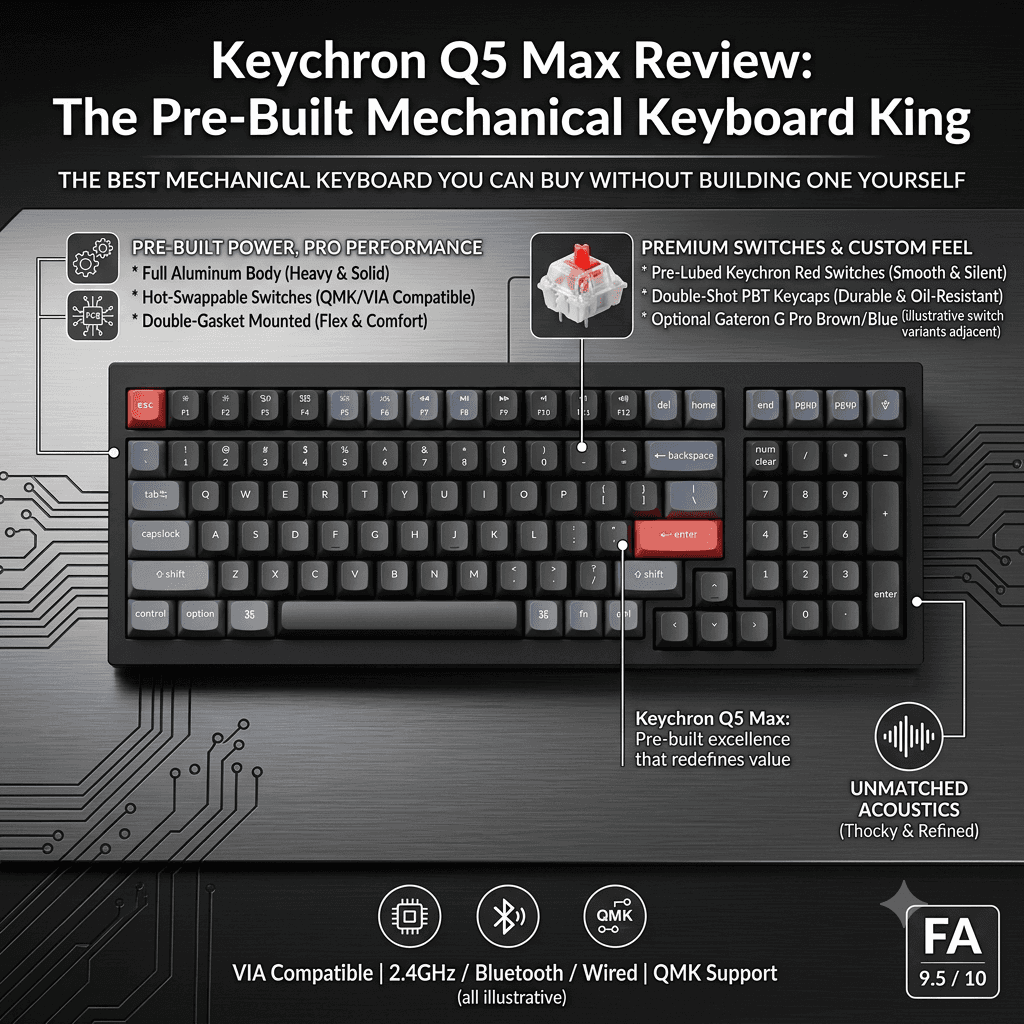
The Keychron Q5 Max delivers a full CNC aluminum chassis, double gasket mount, hot-swappable PCB, tri-mode wireless with 1000Hz polling, a 4000mAh battery, and QMK/VIA programmability — all in a compact 96% layout at $239.99. Rated the best mechanical keyboard by RTINGS.com, it offers a near-custom typing experience straight out of the box, though some real-world quality control caveats mean buyers should go in informed.
Interested in this item?
Get the best verified price using our affiliate link below.
Keychron Q5 Max — At a Glance
Price: $239.99 (Fully Assembled) / $189.99 (Barebone) | Layout: 96% (101 keys) | Connectivity: USB-C / 2.4GHz / Bluetooth 5.1 | Weight: ~2.2kg
The Keychron Q5 Max does something remarkably difficult: it delivers a typing experience that rivals keyboards costing two or three times as much, inside a wireless package with a feature set that mainstream brands are still working toward. Its limitations are real but manageable. Its strengths are exceptional and immediate.
Introduction
Mechanical keyboards occupy a peculiar space in the consumer peripherals market. At the low end, they are commodity products — plastic shells, generic switches, and RGB lighting that impresses for a week and then collects desk dust. At the high end, the custom keyboard hobby commands thousands of dollars for group-buy boards that arrive months after ordering and require soldering, lubing, and foam modifications before they reach their potential. In between, Keychron has spent several years building a brand that addresses both extremes: accessible enough for first-time buyers, capable enough for enthusiasts who know exactly what double gasket mounting and QMK firmware mean. The Q5 Max is Keychron's flagship expression of that philosophy — a 96% layout wireless keyboard in a full CNC aluminum body, with enough hardware and software depth to satisfy modders and enough out-of-box quality to please buyers who simply want something premium that works. RTINGS.com rated it the best mechanical keyboard available in 2026. Phandroid called it "a near-custom experience right out of the box." After extended daily use across writing, programming, and gaming sessions, this review offers a full and honest account of where it earns those accolades — and where it falls short of perfection.
Design & Build Quality
The Q5 Max's build quality is its most immediately and enduringly impressive characteristic. The full CNC-machined 6063 aluminum chassis — the same aluminum alloy grade used in premium custom keyboards costing $400 or more — gives the board a density and structural rigidity that is genuinely rare at this price point. The assembled weight of approximately 2.2 kilograms means this keyboard does not move during intense typing or gaming sessions; it simply stays where you put it, which is either a feature or an inconvenience depending entirely on whether you plan to travel with it. The finish is precise and uniform, with no visible machining marks or surface inconsistencies. Keychron offers the Q5 Max in Carbon Black, Shell White, and Silver colorways, and the anodized finishes hold up well against sustained daily use — the Shell White variant, particularly prone to showing grime on competing keyboards, stays noticeably cleaner than expected in extended testing. The 96% layout is the Q5 Max's defining form factor decision: it retains the full function row, alphanumeric block, navigation cluster, and number pad of a traditional full-size keyboard, but compresses the navigation cluster to reduce overall footprint. The result is a board that is meaningfully more compact than a standard full-size keyboard while sacrificing virtually none of the key accessibility that daily power users, data entry professionals, and spreadsheet-heavy workflows depend on. A volume control rotary knob sits in the upper-right corner above the number pad — a detail that sounds minor until you have it and then cannot imagine working without it. Three additional programmable macro keys adjoin it, providing immediate shortcut access that is fully remappable through the Keychron Launcher web app or QMK firmware.
Typing Feel & Sound Profile
The typing experience on the Q5 Max is the product of three compounding design decisions that Keychron has refined across several keyboard generations: the double gasket mount, multiple acoustic foam layers, and PCB-mounted screw-in stabilizers. The double gasket system — where both the PCB and the plate are independently suspended by silicone gaskets rather than screwed directly to the aluminum case — produces a typing feel that enthusiasts describe as "soft," "cushioned," and "springy." Each keypress has a subtle give that absorbs the energy of bottoming out, reducing finger fatigue in extended typing sessions and producing a sound that is muted and deep rather than sharp and plastic. Multiple layers of acoustic foam — between the PCB and the case, and in some configurations beneath the PCB itself — further dampen sound reflection and case ping, resulting in a keyboard that is notably quiet for a full-metal build. The sound profile in testing is a low, rounded thock that impresses visitors to the desk and holds up pleasantly across hours of uninterrupted use. The factory-installed Gateron Jupiter switches (available in Red linear, Brown tactile, and Banana tactile variants) are pre-lubed from the factory, and the quality of that lubing is significantly better than what mainstream keyboard brands typically deliver. The switches feel smooth and deliberate straight out of the box, with a satisfying tactile bump on the tactile options that communicates each keypress cleanly without excessive noise. Hot-swappable sockets accept virtually all 3-pin and 5-pin MX-style switches — Cherry, Gateron, Kailh, Boba, Novelkeys, and many others — meaning the Q5 Max can be transformed into an entirely different typing experience without tools beyond the included switch puller. This is where the keyboard's value proposition becomes genuinely compelling for enthusiasts: the aluminum chassis, foam stack, and gasket mount provide an outstanding acoustic and tactile foundation that most switches will sound and feel excellent on.
Keycaps
The Q5 Max ships with KSA-profile double-shot PBT keycaps — a meaningful specification at this price tier. PBT plastic is denser and more resistant to shine and texture wear than the ABS keycaps that many competing boards still ship with, including some costing more. The KSA profile is Keychron's own spherical top design, taller than Cherry profile and with a comfortable concave top surface that centers fingertips naturally during extended typing. Users switching from Cherry or OEM profile keycaps should expect a brief adjustment period of a day or two before the profile feels entirely natural. The double-shot legends — where the character is formed by two layers of plastic injection rather than printed on the surface — will not fade, shine out, or wear away regardless of how many years of daily use the keyboard accumulates. Mac and Windows layout keycaps are both included in the box, covering both ecosystems without requiring additional purchases. The Q5 Max PCB uses south-facing LEDs rather than north-facing, which means the LED shines through the front face of each keycap rather than the back — the practical implication is that non-shine-through keycaps (like the included KSA set) can appear dimmer under backlighting, and in dark rooms the RGB illumination is less visually dramatic than north-facing alternatives. For buyers who primarily use their keyboard in well-lit environments and are not purchasing it for RGB display purposes, this is a non-issue. For those who bought it specifically for a dramatic RGB desk aesthetic in low light, it is worth knowing before committing.
Wireless Performance & Battery Life
The Q5 Max's tri-mode wireless — USB-C wired, 2.4GHz wireless via included dongle, and Bluetooth 5.1 — is one of its most practically valuable features, and one that distinguishes it from the majority of enthusiast-tier keyboards that remain wired-only. The 2.4GHz connection delivers a confirmed 1000Hz polling rate with no perceptible latency in gaming and competitive use — a specification that mainstream gaming keyboards have offered for years but that premium typing-focused boards have historically resisted. In testing, no input lag was detectable in either typing or gaming over 2.4GHz, and stability was flawless across eight weeks of daily use. Bluetooth connects to up to three devices simultaneously and switches between them via keyboard shortcut, making the Q5 Max a genuinely practical tool for multi-device setups — switching between a desktop, a laptop, and a tablet in rapid succession. The Bluetooth polling rate of 90Hz introduces a theoretical latency disadvantage for competitive gaming, but is entirely sufficient for typing, programming, and casual gaming use cases. The 4000mAh battery is rated for up to 180 hours without backlighting and approximately 100 hours at moderate backlight levels. In real-world testing with RGB enabled at moderate brightness on 2.4GHz, battery life landed in the 35–50 hour range — shorter than Keychron's maximum rated figure, as expected with active backlighting, but still sufficient for most users to charge once per week under typical use conditions. Charging via USB-C is standard and convenient. One note: battery life on 2.4GHz with RGB active is meaningfully shorter than on Bluetooth, which may influence mode preference for users whose primary concern is minimizing charging frequency.
At $239.99 for the fully assembled version, the Keychron Q5 Max occupies a price point where it competes against both premium mainstream gaming boards and entry-level custom builds. Against mainstream gaming boards, it wins on typing feel and build quality. Against entry custom builds, it wins on wireless and out-of-box usability. Very few keyboards do both things simultaneously.
Software & Customization
The Q5 Max supports both QMK open-source firmware and VIA key remapping software — two standards that represent the ceiling of keyboard programmability. QMK allows every key on the board to be remapped, macro sequences to be programmed, lighting effects to be customized, and layers to be created that transform the keyboard's function with a keypress, without any software running on the connected computer. This is the same programmability framework used by professional keyboard builders and competitive gamers who need precise control over every input. VIA provides a graphical interface for QMK configuration that is accessible to users who are not comfortable with firmware files and command-line tools. Keychron also offers its own web-based Keychron Launcher configurator as an alternative. One community-reported limitation worth noting: in some user experiences, the Q5 Max required a JSON configuration file to be manually loaded before VIA would recognize the keyboard — a minor friction point in the setup process that Keychron has addressed in firmware updates but that may still affect some users depending on their VIA version. QMK compatibility is fully functional and well-documented. The 22 onboard RGB lighting effects cover the full spectrum from subtle breathing patterns to reactive per-keystroke effects, with full hue, saturation, brightness, and speed control. The RGB is configurable without any software via onboard shortcuts, which is a practical convenience for users who prefer to avoid companion software entirely.
The Hall Effect Question
Any honest review of the Keychron Q5 Max in 2026 must acknowledge the broader keyboard market shift that has taken place in the past two years. Hall Effect magnetic switches — which enable Rapid Trigger (where the key resets the moment it begins moving back up, rather than waiting for a physical mechanical reset point) and adjustable actuation depth — have taken over the competitive gaming keyboard market. By April 2026, approximately 40% of tracked professional esports players use Hall Effect or analog optical switch keyboards, up from essentially zero in 2022. The Keychron Q5 Max uses traditional MX-style mechanical switches, which cannot offer Rapid Trigger or adjustable actuation. Keychron has launched Hall Effect variants of its Q series — the Q1 HE and Q5 HE — specifically to address gaming users who need those features. For competitive FPS players in CS2, Valorant, or Apex Legends, the measurable improvement in counter-strafe response time from Rapid Trigger is real, and the Q Max with MX switches is not the right choice for that use case. For typists, programmers, content creators, office workers, and casual gamers — who represent the majority of keyboard buyers — traditional mechanical switches remain excellent, and the Q5 Max's typing feel, sound profile, and wireless feature set make it a superior choice over any Hall Effect board currently available for non-competitive use. The resale value implication is worth noting for buyers who upgrade frequently: the enthusiast community has observed that standard MX keyboard resale values have declined 30–40% within six months while Hall Effect boards retain 70–80% of their value.
Quality Control Caveats
The Q5 Max's most significant and consistently reported limitation is quality control variability. Community teardowns published in December 2025 and January 2026 identified a specific issue dubbed "socket ejection" — where the over-compressed foam layers in some units physically push switch pins out of hot-swap sockets during the natural gasket compression cycle of typing, causing intermittent keystroke registration failures. This is distinct from simple PCB flex and explains why some units fail in a way that persists even after re-seating affected switches. The frequency of this issue in the wild is difficult to quantify precisely, but it appears in a meaningful minority of enthusiast community discussions. Stabilizer quality out of the box is another commonly noted concern: spacebar, Enter, and Backspace keys can exhibit rattling on some units that requires the Holee modification or aftermarket stabilizer replacement — additional work that buyers of a $239 keyboard should not necessarily need to perform. The community consensus is clear: the Q5 Max is an outstanding platform for modding and delivers exceptional results when it works properly, but buyers should purchase from retailers with strong return policies and test the unit thoroughly upon arrival. Keychron's own warranty and customer support processes have received mixed reviews for turnaround speed, which makes retailer return policy more important than it would be for a product with more consistent quality control.
Competition
The Q5 Max's most direct competitors in the premium wireless mechanical keyboard space include the Logitech MX Keys S, the ASUS ROG Azoth 96 HE, and Keychron's own Q Max siblings. The Logitech MX Keys S targets productivity users with a low-profile design, excellent multi-device workflow integration, and a more office-appropriate aesthetic — but it is a membrane-under-keycap keyboard rather than a mechanical one, and it cannot offer the typing feel depth or switch customization of the Q5 Max. The ASUS ROG Azoth 96 HE adds Hall Effect switches and Rapid Trigger to a similar wireless 96% aluminum layout, making it the right choice for users who need gaming-specific input features alongside premium build quality. Its premium price premium over the Q5 Max is meaningful. The Wooting 80HE is the top recommendation for competitive FPS gamers specifically, offering the most refined Rapid Trigger implementation and the most active development community around its firmware — but it lacks the Q5 Max's build quality and wireless connectivity. For pure typing feel and acoustic quality in a wireless package at this price, the Q5 Max remains the benchmark that competing keyboards are measured against.
Who Should Buy It?
The Keychron Q5 Max is the right keyboard for writers, programmers, designers, and professionals who spend significant time at a keyboard and want the best possible typing experience in a wireless package without entering the custom build hobby. It is ideal for multi-device users who need to switch seamlessly between a desktop, laptop, and tablet at their desk. The 96% layout makes it particularly well-suited to users who require a number pad for data entry or spreadsheet work but want to minimize total desk footprint. Keyboard enthusiasts who want an outstanding platform to mod — swapping switches, replacing stabilizers, and adjusting foam layers — will find the Q5 Max among the most rewarding bases available at this price point. It is a harder sell for competitive FPS gamers who need Rapid Trigger, for buyers who require guaranteed flawless out-of-box quality without any tinkering, and for users who travel with their keyboard regularly and find 2.2kg impractical.
Final Verdict
The Keychron Q5 Max earns its top ranking from RTINGS.com and its enthusiastic reception across the keyboard community through a combination of strengths that no competing product at this price point fully replicates simultaneously: full CNC aluminum construction, double gasket typing feel, exceptional acoustic performance, true hot-swap flexibility, tri-mode wireless with 1000Hz gaming-grade 2.4GHz polling, full QMK and VIA programmability, and Mac and Windows compatibility in one package. The quality control variability and out-of-box stabilizer inconsistency are real limitations that a $239 keyboard should not have, and buyers should approach the purchase with a good return policy in hand. But when a Q5 Max unit arrives in good condition — and the majority do — it delivers a typing experience that genuinely rivals custom boards costing two to three times as much, and a wireless implementation that most of those custom boards still cannot match. For anyone willing to engage with what this keyboard truly is — an outstanding platform that rewards the hands that use it daily — the Keychron Q5 Max is the mechanical keyboard to buy in 2026.
Score: 8.6 / 10 | Reviewed on a fully assembled Keychron Q5 Max in Carbon Black with Gateron Jupiter Banana tactile switches, used daily across eight weeks of writing, programming, and gaming sessions. Firmware version 1.0.7.
Ready to Purchase?
We gather active retail prices. Click below to buy this product securely.