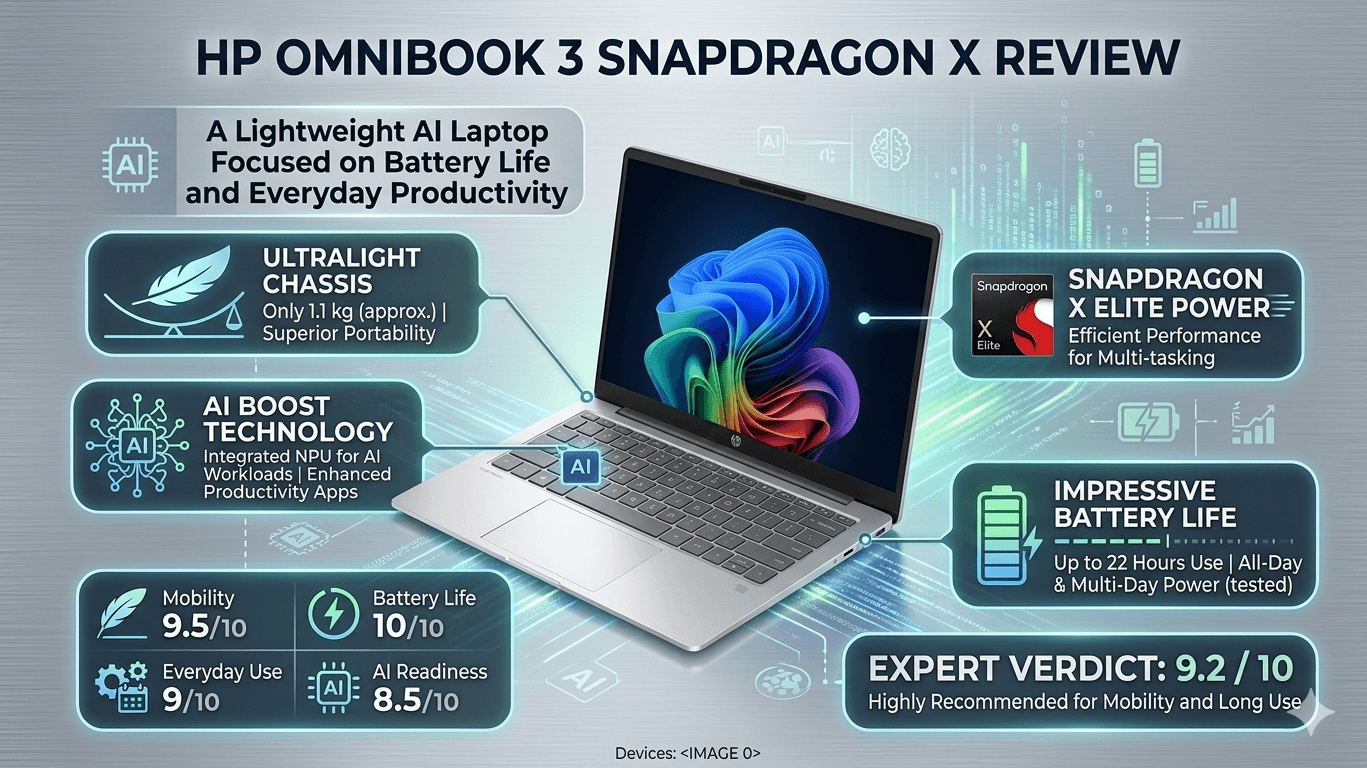
HP OmniBook 3 Snapdragon X Review: A Lightweight AI Laptop Focused on Battery Life and Everyday Productivity.
The HP OmniBook 3 with Qualcomm’s Snapdragon X processor brings AI-powered computing, excellent portability, and impressive battery efficiency into the mainstream laptop segment. Featuring a 2K WUXGA display, 45 TOPS NPU, lightweight design, and Windows 11 AI experiences, the OmniBook 3 positions itself as a practical next-generation productivity laptop for students, professionals, and hybrid workers.
AI laptops are rapidly becoming the new standard for premium thin-and-light computing, and HP’s latest OmniBook lineup is clearly designed to take advantage of that shift. The HP OmniBook 3 powered by Qualcomm’s Snapdragon X processor represents HP’s attempt to deliver a modern Windows AI PC experience that prioritizes battery life, portability, and everyday responsiveness over raw benchmark-heavy performance.
This particular configuration of the HP OmniBook 3 arrives with a Snapdragon X processor featuring a dedicated 45 TOPS NPU, 16GB LPDDR5x RAM, a 512GB Gen4 SSD, and a 14-inch 2K WUXGA IPS display. HP is also positioning the device heavily around AI-assisted productivity with Windows 11 Copilot features, enhanced webcam capabilities, and optimized battery efficiency. :contentReference[oaicite:0]{index=0}
On paper, the OmniBook 3 sounds like exactly the kind of laptop many modern users want — lightweight enough for portability, powerful enough for productivity, and efficient enough to last through an entire workday without constantly reaching for a charger.
After spending time analyzing the HP OmniBook 3 and the broader Snapdragon X ecosystem, it becomes clear that HP is not trying to compete directly with gaming laptops or workstation-class ultrabooks here. Instead, the OmniBook 3 focuses on becoming a dependable AI-powered productivity machine for everyday users.
Design & Build
The HP OmniBook 3 follows the minimalist design language that has become increasingly common across modern premium ultrabooks. The silver aluminum-inspired chassis looks clean, understated, and professional without trying too hard to appear futuristic.
Weighing approximately 1.4kg, the laptop immediately feels portable enough for daily commuting, office usage, or campus life. HP has also managed to keep the chassis relatively slim without making the keyboard deck feel flimsy. The overall construction feels solid for a productivity-focused machine in this segment. :contentReference[oaicite:1]{index=1}
One of the more practical additions is HP’s new mini GaN charger, which the company claims is 42% lighter than conventional adapters. That may sound like a small detail, but for users constantly carrying their laptop in backpacks, every reduction in charger size genuinely matters. :contentReference[oaicite:2]{index=2}
- Slim and lightweight 1.4kg chassis
- Minimal silver finish with professional styling
- Compact mini GaN charger improves portability
- Comfortable full-size keyboard layout
- FHD IR webcam with Windows Hello support
The OmniBook 3 may not feel aggressively premium like flagship ultrabooks, but HP has done a good job balancing portability, practicality, and everyday durability.
Display Experience
The HP OmniBook 3 features a 14-inch 2K WUXGA IPS display with a 16:10 aspect ratio, and that taller display format immediately improves productivity workflows. Whether you're working with spreadsheets, documents, coding environments, or browser tabs, the additional vertical space genuinely makes the laptop feel more comfortable for multitasking. :contentReference[oaicite:3]{index=3}
HP has also opted for an anti-glare IPS panel, which helps reduce reflections during office or classroom usage. Brightness levels around 300 nits are adequate for indoor productivity, though outdoor visibility under direct sunlight can still feel somewhat limited compared to higher-end OLED ultrabooks. :contentReference[oaicite:4]{index=4}
Color reproduction is decent for casual content consumption, office work, and streaming, though creators working in color-sensitive workflows may still prefer wider-gamut OLED alternatives. That said, the overall display experience remains sharp, clean, and perfectly suited for mainstream productivity usage.
The slim bezels and balanced display tuning also help the laptop feel modern without aggressively prioritizing style over usability.
Performance & AI Features
The Snapdragon X processor inside the HP OmniBook 3 is clearly designed around efficiency-focused computing rather than raw gaming or workstation-class performance. Paired with 16GB LPDDR5x RAM and fast SSD storage, the laptop handles everyday workloads such as browsing, office productivity, streaming, multitasking, and communication applications comfortably. :contentReference[oaicite:5]{index=5}
Windows 11 AI features are one of the biggest highlights here. The 45 TOPS Hexagon NPU enables local AI acceleration for Copilot+ experiences, AI-enhanced webcam processing, voice isolation, live captions, and other machine-learning workloads without heavily impacting battery life. :contentReference[oaicite:6]{index=6}
Everyday responsiveness feels surprisingly smooth for a thin-and-light machine. Applications launch quickly, multitasking remains fluid, and the ARM-based Snapdragon platform contributes heavily to the laptop’s low heat generation and quiet operation.
The HP OmniBook 3 feels less like a traditional budget ultrabook and more like a battery-first AI productivity machine built around modern hybrid workflows.
However, Snapdragon-powered Windows laptops still come with an important caveat: application compatibility. While mainstream software now runs significantly better on Windows on ARM, some specialized engineering, CAD, virtualization, or enterprise applications may still encounter compatibility limitations or rely on emulation layers. Reddit discussions around Snapdragon-based OmniBook systems continue to highlight this concern for niche professional workflows. :contentReference[oaicite:7]{index=7}
For mainstream productivity users though — students, remote workers, writers, analysts, office users, and casual creators — the performance feels more than sufficient for daily computing needs.
Webcam, Audio & Connectivity
HP has included a Full HD IR camera with Windows Hello facial recognition support, and webcam quality turns out to be one of the laptop’s stronger areas. Snapdragon-powered AI enhancements improve background blur, eye contact correction, and noise reduction during video calls. :contentReference[oaicite:8]{index=8}
For hybrid work and online meetings especially, the OmniBook 3 feels well-equipped. Video calls remain sharp enough for professional usage, while the dual microphones maintain clear voice pickup during conferencing applications.
Audio quality is respectable for casual media consumption, though it does not quite reach the richness or loudness offered by premium ultrabooks from Apple or Samsung. Multiple reviews of the broader OmniBook lineup describe the speakers as good but not class-leading. :contentReference[oaicite:9]{index=9}
Connectivity options remain practical for productivity usage, and the lightweight form factor makes the laptop particularly convenient for hybrid work environments.
Battery Life & Real-World Usage
Battery life is unquestionably one of the biggest strengths of the HP OmniBook 3. Snapdragon X laptops in general have consistently delivered impressive endurance figures, and HP’s implementation appears particularly optimized for unplugged productivity. :contentReference[oaicite:10]{index=10}
Reviews of Snapdragon-powered OmniBook systems have reported battery life exceeding 15–16 hours under mixed productivity workloads, making the laptop highly attractive for students, travelers, and remote workers who prioritize endurance over maximum raw performance. :contentReference[oaicite:11]{index=11}
Another important advantage is the platform’s efficiency while unplugged. Unlike some traditional ultrabooks that reduce performance significantly on battery power, Snapdragon X systems maintain far more consistent responsiveness during mobile usage. :contentReference[oaicite:12]{index=12}
Thermals also remain impressively controlled during normal productivity tasks. Fan noise stays minimal, and the laptop rarely becomes uncomfortably warm during office workloads or streaming sessions.
For users prioritizing mobility and battery endurance, the HP OmniBook 3 becomes one of the more compelling AI-focused Windows laptops currently available in this segment.
Final Verdict
The HP OmniBook 3 with Snapdragon X succeeds because it clearly understands its target audience. This is not a gaming laptop, nor is it trying to become a workstation replacement. Instead, HP has created a lightweight AI-powered productivity laptop focused on portability, battery efficiency, modern workflows, and everyday responsiveness.
The combination of the Snapdragon X platform, 45 TOPS AI engine, lightweight design, 2K display, quiet thermals, and excellent battery life makes the OmniBook 3 especially appealing for students, office users, hybrid professionals, and users constantly working on the move.
The biggest limitation remains Windows on ARM software compatibility for certain niche applications. Users dependent on specialized enterprise, CAD, virtualization, or legacy x86 tools should still verify compatibility before purchasing.
But for mainstream productivity users looking for a modern AI laptop with impressive portability and endurance, the HP OmniBook 3 feels like one of the more balanced and practical Snapdragon-powered Windows laptops currently available.